
1
Send to the shared area
When one item or a multi-selection is active, the shared-area button can copy the selected part from the workspace, group, true/false action branch, dialog, and variables surfaces into the device-local library.
No-Code Workspace — Block Reference
Interprets OCR text with AI and produces a decision
Documented for app version 1.0.51Updated:
Block Preview
Captured from the in-app Visual Builder block card in the English UI.
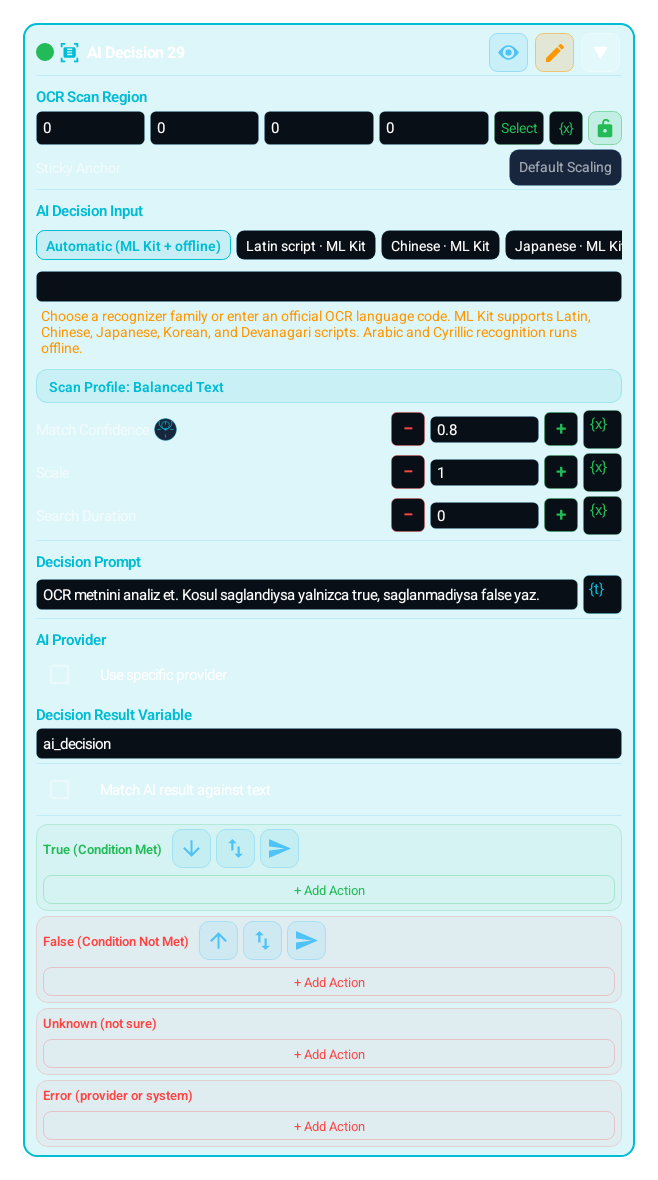
Reads text from the selected region via OCR, sends that text to your prompt through AI.ask, and stores the response in a variable. It can optionally branch to TRUE/FALSE with a match rule. Use it when you need flexible text interpretation instead of a rigid threshold.
IMAGE, TEXT, COLOR and the other search blocks that use the Search Regions editor can define several search regions with + Add Region; OCR_VALUE tries its read regions in order. Inside a search region, Exclude Region skips noisy areas such as a HUD or a badge, and it applies only to the search region it belongs to. From 1.0.51 one search region can hold several excluded regions, each with its own shape and its own variable or Dialog binding.Newv1.0.51
You can now assign a sticky anchor to each search region. This brings Region.sticky into the no-code surface so the region can stay aligned to anchors such as top_left, bottom_right, or center when screen geometry changes.
Search Duration (ms) defines one search window; 0 means a single look. Retry Mode in the Retry & Wait section is Off, Infinite Loop, Retry On True, Retry On False, Wait Until Found, or Wait Until Gone, so a block becomes a one-shot check, a controlled polling step, or a step that waits for a target to appear or to disappear. Retry Timeout (ms, 0 = unlimited) bounds the loop; Scan Rate (Hz) sets scans per second.
mScore, scale, and scan engine choices matter across themes, display sizes, and rendering differences. Smaller regions plus the right engine dramatically improve builder stability.
When you need a more flexible interpretation of on-screen text:
Classifying OCR text as "allow / deny"
Reducing longer or noisy text into one decision
Asking whether the current screen indicates an error or success
Making a contextual judgment beyond a simple keyword search
"Add Block" → "AI Decision (AI_DECISION)"
SCAN REGION: Select the area containing the text to interpret
OCR SETTINGS: Choose the script family or enter one of the supported cataloged OCR locale-routing codes, then tune the engine, scale, and OCR time budget. Arabic and Cyrillic recognizer families are also in the routing catalog, so codes such as ar and ru can be selected directly. Catalog coverage is not an independent per-language accuracy guarantee
PROMPT: Tell the model exactly what output you want (example: "Return only allow or deny")
PROVIDER (optional): Use auto or enter a specific provider ID
AI KEY: Configure the required key in app settings first; block-level overrides are no longer supported
RESULT VARIABLE: Enter the variable name that will store the AI response
MATCH RULE (optional): Define equals / contains / not_contains against an expected value
Configure TRUE/FALSE and UNKNOWN/ERROR fallbacks; with matching off, a successful nonblank reply takes TRUE
Area containing the OCR text that AI will interpret
Instruction that defines the response format you want from the model
Auto or specific provider selection. The key is always read from app settings.
Variable that stores the AI response
Checks the expected response via equals / contains / not_contains
| Parameter | Description |
|---|---|
| Scan Region | Area containing the OCR text that AI will interpret |
| Prompt | Instruction that defines the response format you want from the model |
| Provider | Auto or specific provider selection. The key is always read from app settings. |
| Result Variable | Variable that stores the AI response |
| Match Rule | Checks the expected response via equals / contains / not_contains |
Scenario: Interpret an error panel with AI
Add AI_DECISION
Scan region: The panel showing the warning text
Prompt: "If this OCR text is a temporary issue, answer retry; if it is permanent, answer stop."
Result variable: "ai_decision"
Match rule: equals "retry"
TRUE: WAIT 2000ms + try again
FALSE: LOG "Permanent failure: {{ ai_decision }}"
MOST COMMON COMBINATIONS:
AI_DECISION + WAIT: Retry based on interpretation
AI_DECISION + SWITCH_CASE: Multi-branch routing from AI output
AI_DECISION + LOG: Capture the model response
OCR_VALUE + AI_DECISION: Combine numeric and semantic reading
AI_DECISION + HTTP_REQUEST: Report the decision to a remote system
Interprets OCR text with AI and produces a decision
WARNING:
This block depends on both OCR quality and AI provider availability; if OCR is blank or the AI call fails, the result may stay empty
Vague prompts can produce inconsistent answers; constrain the output format clearly
Blank AI replies take UNKNOWN; OCR/provider failures take ERROR, falling back to FALSE when that branch is empty
AI keys can no longer be overridden from the block; configure them only in app settings
The same block at three levels: a quick start, the real options, and professional techniques.
AI_DECISION reads the text in your selected region via OCR, sends that text with your prompt through AI.ask, and writes the model's reply into a variable. Use it when you need flexible text interpretation beyond a fixed threshold or keyword search — for example deciding whether a screen means "error" or "success".
OCR script/language, engine, scale and time budget control reading; a match score is not a confidence filter for raw OCR. Add or delete regions and choose their shapes. The first nonblank text is used; without text no AI request is sent. A zero timeout uses the default 750 ms OCR budget and up to three attempts; a positive timeout allows 1–10 attempts. This budget covers OCR, while the provider has a separate network timeout. auto uses the active MH-AI profile; specific selects the named provider preset with a saved account. aiDecisionResultVar holds the raw reply. If an input or expected answer refers to the result variable, its previous value is read; the new reply is published before the outcome branch starts. equals, contains and not_contains compare literal text case-insensitively; a blank expected value never matches. With matching off, a successful nonblank reply takes TRUE; this does not mean the reply is semantically affirmative. Use SWITCH_CASE to interpret it further.
Outcomes are exclusive: a valid match takes TRUE, a mismatch takes FALSE, a successful blank reply takes UNKNOWN, and OCR/provider failures or invalid configuration take ERROR. An empty UNKNOWN/ERROR branch falls back to FALSE; blank replies cannot satisfy not_contains. Stop and execution-budget signals propagate. Each execution makes at most one AI.ask call, with no automatic provider retry. Keys come only from MH-AI settings; the legacy block key field is ignored. Network failures log a generic message. OCR, prompts and model replies may be wrong or adversarial; an AI decision provides no deterministic accuracy guarantee. Use narrow regions and a short, explicit output format, and independently verify critical actions.
Small, reproducible examples that combine several blocks — build them straight into your own macro.
This block is useful on its own — but it shines when paired with the right partners.
Combine numeric reading (OCR_VALUE) with semantic interpretation (AI_DECISION) to use both the value and the context.
When the AI reply is multi-valued rather than a single TRUE/FALSE, SWITCH_CASE branches into several paths by the answer.
To retry based on the interpretation (e.g. "retry") add WAIT after the decision to pace the loop.
Configure ERROR and UNKNOWN branches first; use ERROR_HANDLER for shared action failures.
A vague prompt makes the reply inconsistent; constrain the output format hard (e.g. ask for a single word only).
When OCR is blank the AI is never called and the result stays empty; remember to design a separate branch/fallback for the empty reply.
Trying to interpret a visual (non-text) target with AI_DECISION; in that case MH_VISUAL_DECISION is the right block.
Trying to put the key inside the block; overrides are disabled, configure the key in app settings.
Narrow the region as much as possible: less OCR text means both more accurate reading and a shorter (cheaper, faster) prompt.
To branch directly, force the prompt to a single word and produce deterministic TRUE/FALSE with an equals match rule.
Pick AI_DECISION when text is legible and MH_VISUAL_DECISION when the decision is visual/contextual; choosing the right block markedly cuts cost and latency.
Choose the match mode by intent: equals for single-word deterministic answers (e.g. exactly "retry"), contains when you look for a keyword inside the reply (the model may add extra words), not_contains to turn the ABSENCE of a word into a condition. When in doubt, forcing the prompt to one word plus equals gives the most reliable TRUE/FALSE.
When you need consistency or quota control, set provider mode to specific and pin one aiDecisionProviderId; leaving it auto uses the app's chosen default.
The Lua below is what the Code Editor generates for this block with sample settings. Adding cases, branches, actions or loops, or changing settings, extends the generated code accordingly. Study it to see what the block does under the hood, to learn Lua, or to copy and adapt it. Use the Copy button (top-right) to paste it into the Code Editor, or “Try in Editor →” to run it in the live editor.
local ai_decision = nil

local _mhOcrClock = Stopwatch ~= nil and Stopwatch() or nil
if _mhOcrClock ~= nil then _mhOcrClock:start() end
local function _mhOcrNow()
 if _mhOcrClock ~= nil then return _mhOcrClock:elapsed() end
 return System.currentTime()
end

do
 local _aiReply1 = ""
 local _aiOk1 = false
 local _aiError1 = ""
 local _ocrText1 = ""
 local _ocrReadParam1 = {ocrScript="auto", scale=1.0, mScore=0.8, engine="balanced_text"}
 local _aiPromptSeed1 = "Return true or false"
 local _aiProvider1 = nil
 local _aiConfigOk1 = true and Str.trim(tostring(_aiPromptSeed1 or "")) ~= ""
 local _ocrBudget1 = 750
 if _ocrBudget1 <= 0 then _ocrBudget1 = 750 end
 local _ocrMaxAttempts1 = 3
 local _ocrAttempt1 = 0
 local _ocrStart1 = _mhOcrNow()
 repeat
  if not _aiConfigOk1 or (_ocrBudget1 - (_mhOcrNow() - _ocrStart1)) <= 0 then break end
  _ocrAttempt1 = _ocrAttempt1 + 1
  if _ocrAttempt1 == 2 then
   _ocrReadParam1.scale = 1.6
  elseif _ocrAttempt1 >= 3 then
   _ocrReadParam1.scale = 2.0
  end
  if _ocrAttempt1 > 1 and Snap.clear then pcall(function() Snap.clear() end) end
  local _ocrRefreshOk1, _ocrRefreshError1 = pcall(function() Snap.screenRefresh() end)
  if not _ocrRefreshOk1 then
   local _ocrRefreshSignal1 = string.lower(tostring(_ocrRefreshError1 or ""))
   if string.find(_ocrRefreshSignal1, "compatstopexception", 1, true) or string.find(_ocrRefreshSignal1, "script durduruldu", 1, true) or string.find(_ocrRefreshSignal1, "budget_", 1, true) then
    error(_ocrRefreshError1, 0)
   end
  end
  if _ocrRefreshOk1 then
   if Str.trim(_ocrText1) == "" and (_ocrBudget1 - (_mhOcrNow() - _ocrStart1)) > 0 then
    local _ocrReadOk__ocrRegion1_1, _ocrReadText__ocrRegion1_1 = pcall(function()
     _ocrReadParam1.timeout = math.max(1, math.min(30000, _ocrBudget1 - (_mhOcrNow() - _ocrStart1)))
     local _ocrRegion1_1 = Region():noScale()
     return _ocrRegion1_1:readAsString(_ocrReadParam1, "") or ""
    end)
    if not _ocrReadOk__ocrRegion1_1 then
     local _ocrReadError__ocrRegion1_1 = string.lower(tostring(_ocrReadText__ocrRegion1_1 or ""))
     if string.find(_ocrReadError__ocrRegion1_1, "compatstopexception", 1, true) or string.find(_ocrReadError__ocrRegion1_1, "script durduruldu", 1, true) or string.find(_ocrReadError__ocrRegion1_1, "budget_", 1, true) then
      error(_ocrReadText__ocrRegion1_1, 0)
     end
    end
    if _ocrReadOk__ocrRegion1_1 then
     _ocrText1 = tostring(_ocrReadText__ocrRegion1_1 or "")
    end
   end
  end
  if Str.trim(_ocrText1) == "" and _ocrAttempt1 < _ocrMaxAttempts1 and (_ocrBudget1 - (_mhOcrNow() - _ocrStart1)) > 0 then
   wait(math.min(1, math.max(0, _ocrBudget1 - (_mhOcrNow() - _ocrStart1))))
  end
 until Str.trim(_ocrText1) ~= "" or _ocrAttempt1 >= _ocrMaxAttempts1 or (_ocrBudget1 - (_mhOcrNow() - _ocrStart1)) <= 0
 if _aiConfigOk1 and Str.trim(_ocrText1) ~= "" then
  local _aiUserPrompt1 = tostring(_aiPromptSeed1 or "") .. "\n\nOCR text:\n" .. tostring(_ocrText1 or "")
  local _aiCallOk1, _aiResponse1 = pcall(function()
   return AI.ask(_aiUserPrompt1, _aiProvider1)
  end)
  if not _aiCallOk1 then
   local _aiControlSignal1 = string.lower(tostring(_aiResponse1 or ""))
   if string.find(_aiControlSignal1, "compatstopexception", 1, true) or string.find(_aiControlSignal1, "script durduruldu", 1, true) or string.find(_aiControlSignal1, "budget_", 1, true) then
    error(_aiResponse1, 0)
   end
  end
  if not _aiCallOk1 then
   _aiResponse1 = { ok = false, error = "AI request failed." }
  end
  if type(_aiResponse1) == "table" and _aiResponse1.ok == true and type(_aiResponse1.text) == "string" then
   _aiOk1 = true
   _aiReply1 = _aiResponse1.text
  else
   _aiError1 = type(_aiResponse1) == "table" and tostring(_aiResponse1.error or "") or "AI request failed."
   System.log("AI_DECISION provider request failed")
  end
 else
  _aiError1 = _aiConfigOk1 and "AI_DECISION OCR text was blank." or "AI_DECISION configuration is invalid."
  System.log(_aiError1)
 end
 ai_decision = _aiReply1
end
Note: generated code can evolve across versions; helper names (e.g. _reg1, m1) and internal optimizations may change. The logic and the called APIs reflect the block’s behavior.
The guidance below is not identical for every block. It summarizes the professional controls that most often repeat in the selected block family.
Keep the search close to the target. Smaller regions are faster and more stable.
Exclude static noise, badges, animations, or reflective areas to reduce false matches.
Timeout and scan rate define whether the block acts as a single check or controlled polling step.
mScore, scale, and engine choice must be tuned together for theme, resolution, and rendering differences.
OCR_VALUE writes the number it reads to its result variable (default ocr_val); TEXT writes the text it passed through its find/replace step to the Save Read Value variable (default ocr_val). In Match Variables, the score variable (0.0–1.0 confidence) and the X/Y/W/H variables carry the match confidence and position into later blocks: branch on the score with COMPARE, and in CLICK bind the coordinates to them with {x} or turn on Click on match. _lastMatch is the last match that Click on match uses; _lastOcrText is kept only for older CUSTOM_CODE scripts.
TOUCH and TOUCH_BREAK cover recipe-style touch flows. Raw pointer choreography such as Touch.down, Touch.move, Touch.up, Touch.dispatch, Touch.reset, Touch.breakAll, and Touch.releaseAfter is not exposed as a first-class builder block.
Touch.downTouch.moveTouch.upTouch.dispatchTouch.resetTouch.breakAllTouch.releaseAfterThe DIALOG block and dialog designer cover a bounded field set in the builder: Info Text, Text Input, Checkbox, Description, Radio Group, Dropdown, Multi Select, Tab Group, Date Time, Number Range, Slider, Image Picker, Color Picker, File Picker, Recorder Picker, Tag, Signature, and Spacer. The buttons are designed too: the Positive button and Negative button tabs set each button’s text, background, and border color, corner radius, and minimum height next to a preview. Freer Setting.builder composition, multi-step wizard flows, and mixed HUD/dialog choreography still do not map 1:1 into the builder.
Newv1.0.51Two more fields: Agent Detect references (agent_detect_editor) lets the user pick a saved reference set or add and edit references, and Save confirms the selection; Navigation setup editor (navigation_editor) edits a saved map, marker and route from the Dialog and returns the setup and route selection without moving the character.
Setting.builderDialogHudTextViewAgentDetectEditorNavigationEditorHTTP_GET, HTTP_POST, and HTTP_PUT cover common fixed-method flows; HTTP_REQUEST covers one bounded request with method, header lines, body, content type, query parameters (GET and DELETE), timeout, and a bounded retry. These blocks never throw; they write the status code (-1 on a network failure). Cookie handling, chained request objects, and lower-level client flows still need the code editor.
Request()Request.setCookieRequest.getCookiesCUSTOM_CODEThe MAP, LIST, JSON_PARSE, REGEX_MATCH, and METRICS blocks cover the everyday cases: map actions, a static list, reading a value from a JSON path, regex match, find, replace, and split, and metrics actions. The rest of the Map, Array, JSON, Regex, and Metrics APIs (for example Array sort, filter, and map) is broader than the builder recipe model and stays on the CUSTOM_CODE and code editor side.
MapArrayJSONRegexMetricsRuntime helpers, raw Request objects, Lua built-ins such as print/pcall/xpcall, and free-form object chaining patterns are represented through CUSTOM_CODE or the code editor.
RuntimeRequestprintpcallxpcallCUSTOM_CODEEach block card now exposes an independent breakpoint toggle. When enabled, the breakpoint preference is stored with the block.
Breakpoints are only emitted into runtime code when Debug Mode is enabled from Visual Builder settings. When Debug Mode is off, breakpoints stay saved but do not pause execution.
Use ASSERT for fail-fast validation, and use breakpoints for step-by-step tracing and controlled pauses in the same flow.
Variables defined with SET_VARIABLE are accessible throughout the macro (global scope). All blocks can read/write the same variable.
However, a variable defined inside a GROUP will be 'nil' (undefined) until the GROUP executes. Blocks outside the GROUP using this variable may produce unexpected results.
FOR_EACH loop variables (item and index) only carry valid values inside the loop body. Outside the loop they are outside local scope and should not be used.
TRY_CATCH error variable is only valid within the catch block. If the try block succeeds, the catch branch is not entered and the error variable remains undefined.
TIP: Before using a variable inside a GROUP, assign a default value with SET_VARIABLE outside the GROUP. This way the variable won't be nil even if the GROUP has not run.
You can embed variable values and calculations into text fields using {{ expression }} syntax. Expressions inside double curly braces are evaluated as Lua code and the result is inserted into the text.
{{ expression }}Skor: {{ score + 1 }} → "Skor: " .. tostring(score + 1){{ name }} kazandı! → tostring(name) .. " kazandı!"X:{{ x }} Y:{{ y }} → "X:" .. tostring(x) .. " Y:" .. tostring(y)Expressions are checked by the sandbox policy. Security-sensitive calls like loadstring, require, debug are automatically blocked.
Keep scan regions as small as possible — improves speed, reduces false matches.
Always add an exit condition when using infinite loops (BREAK, timeout, or conditional exit).
Use network operations and error-prone steps inside TRY_CATCH.
If you need global error handling, use the Error Handler (ERROR_HANDLER) block as a singleton in the project.
Small coordinate offsets (CLICK/SWIPE) improve tap accuracy across different DPI and screen scales.
Customize macros with Dialog block — different parameters each run.
Define repeating steps once with GROUP_CALL, call from many places.
Cross-macro local library
The Local Shared Macro Area moves blocks, variables, dialog fields, gallery assets, and imported media dependencies between macros on the same device. It is device-local, not cloud sync, not Firebase sharing, and not a replacement for public macro sharing.
Professional usage model: put a reusable login flow, common scan region, shared dialog form, variable group, template image, color profile, replay recording, or imported PLAY_SOUND media file into the shared area from one macro, then import it from the relevant + menu in another macro.
VISUAL_BLOCKSVARIABLESDIALOG_FIELDSTEMPLATE_IMAGECOLOR_SWATCHREPLAY_RECORDMEDIA_FILEWhen one item or a multi-selection is active, the shared-area button can copy the selected part from the workspace, group, true/false action branch, dialog, and variables surfaces into the device-local library.
The shared-area entry under the + menu imports the selected item into the surface that opened it. Main workspace, group, action branch, dialog, and variables each receive the compatible item type.
Gallery items include template images, color swatches, replay records, and imported audio/media files. They can move between macros on the same device so repeated templates, colors, recordings, and PLAY_SOUND media assets do not need to be captured again.
The shared area is not a permanent dumping ground. Delete stale shared items from the shared-library panel; imports create a copy in the target macro and do not rewrite the source macro flow.
AI assistant
Tell MH AI what you want in plain language; it proposes the right block sequence and lands it in the workspace after you approve. In the current release it works with cloud providers such as Gemini, Claude, and OpenAI; on-device local models are on the roadmap.